For the latest updates and improvements in production, open docs.codacy.com instead.
Codacy quickstart (5 min)#
Codacy is an automated code quality and coverage platform that analyzes your source code and identifies issues as you go, helping your team ship robust software by scanning over 40 programming languages, such as JavaScript, Python, Java, C#, and PHP.
Check out our product demo for an overview of Codacy's main features (recorded on November, 2025):
By integrating with your Git provider, Codacy keeps track of your team’s work, analyzes relevant commits, highlights problems, suggests improvements, and protects your codebase from unwelcome changes. From organization and repository level to individual files, pull requests, and commits, Codacy monitors the following metrics across your projects:
- Issues: violations of a given rule, standard, convention, or best practice, from inconsistent code formatting to security risks
- Complexity: a measure of the number of execution paths through a program's source code
- Duplication: the amount of duplicated portions of code
- Coverage: the percentage of lines of code covered by automated tests
Adding your organization to Codacy#
To get started, head to codacy.com and click Start free. Then, follow these steps:
1. Signing up#
Sign up with a Git provider such as GitHub, GitLab, or Bitbucket. This links your Codacy user with your Git provider user, making it easier to add repositories to Codacy and invite your teammates.
Codacy will request access to your Git provider during the authorization flow. Check the permissions that Codacy requires and why.
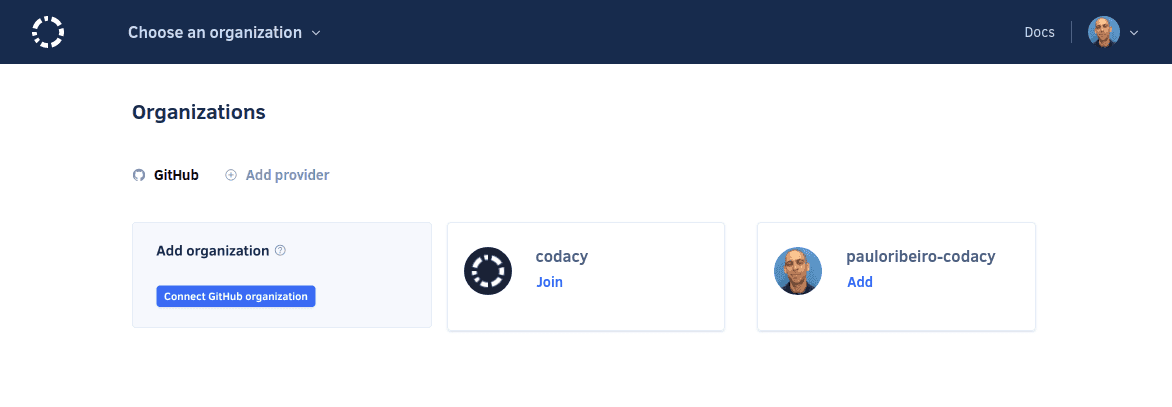
2. Choosing an organization#
Now, you'll need to add or join the organizations that contain your repositories. The organization with the same name as your Git provider username contains your personal repositories. Read more about organizations on Codacy.
To proceed, select one of the organizations.
Note
If you can't see the organization you're looking for, follow these troubleshooting instructions.
Next steps#
Before adding your repositories to Codacy, it's important that you configure your organization to align with your corporate policies and ensure consistent code quality across your repositories.
Share your feedback 📢
Did this page help you?
Thanks for the feedback! Is there anything else you'd like to tell us about this page?
255 characters left
We're sorry to hear that. Please let us know what we can improve:
255 characters left
Alternatively, you can create a more detailed issue on our GitHub repository.
Thanks for helping improve the Codacy documentation.
Edit this page on GitHub if you notice something wrong or missing.
If you have a question or need help please contact support@codacy.com.